Intelligent Zone
Monitoring & Control
Draw restricted zones directly on your camera feeds. SafetyEye AI detects unauthorized access, vehicle-pedestrian proximity violations, and machine danger radius breaches in real-time.
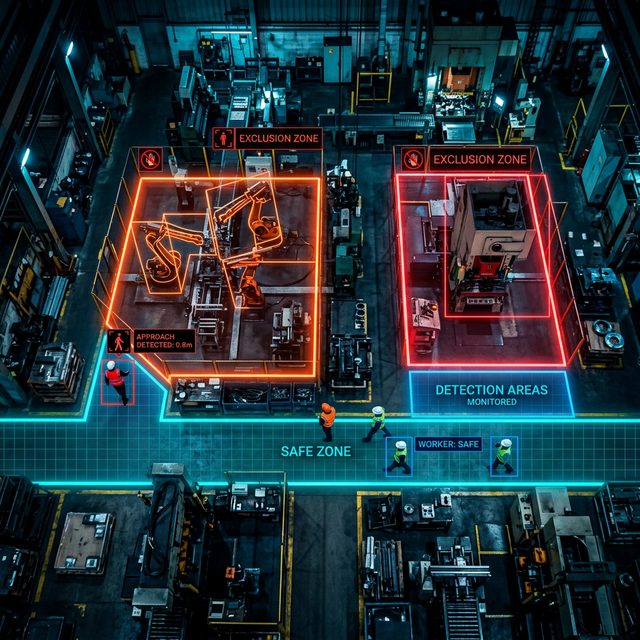
How Zone Monitoring Works
Define, detect, and alert — all from the dashboard.
Draw Zones
Use the visual editor to draw polygonal exclusion zones, safe corridors, and danger radii directly on your camera feeds.
Define Rules
Set natural language rules like "person without helmet in zone A" or "vehicle within 3 meters of pedestrian path."
Get Alerts
Real-time notifications when rules are violated. Every event is timestamped, logged, and available for compliance reports.
Zone Types
- ● Exclusion Zones — No entry allowed. Instant alert on any human detection.
- ● Restricted Zones — PPE required. Alert on workers without proper equipment.
- ● Safe Corridors — Pedestrian-only paths. Alert on vehicle intrusion.
- ● Proximity Zones — Dynamic detection radius around machines or vehicles.
Zone Monitoring Use Cases
Machine Guarding
Enforce safety perimeters around heavy machinery. Alert when workers enter danger zones without proper lock-out/tag-out.
Vehicle-Pedestrian
Detect proximity between forklifts, trucks, and pedestrians. Alert before collisions happen.
Hazmat Areas
Monitor access to chemical storage and hazardous material zones. Ensure only authorized personnel enter.
Protect Your Restricted Areas
See how SafetyEye AI can enforce zone safety in your facility.